Shop example
The shop is AAT's offline quick start. aat-sandbox serves its API on your machine, aat-sandbox init shop
extracts the project, and the repository keeps it at
examples/shop. The rest of this page is that
project's README.
A complete AAT project for a small e-commerce API that runs on your machine. aat-sandbox serves
the API with no signup and no network, and this directory holds everything AAT needs to drive it:
an 18-operation graph, workflows with slots and addons, 12 layers, 7 plans, two regions, negative
tests, a response visualizer, and MCP configuration for AI coding tools.
60-second start
aat-sandbox init shop && cd shop   # extract this project (in a source checkout: cd examples/shop)
aat-sandbox serve &                # shop API on :8765, payments on :8766, payments over gRPC on :8767
aat run plan full-lifecycle
aat run plan smoke --env eu
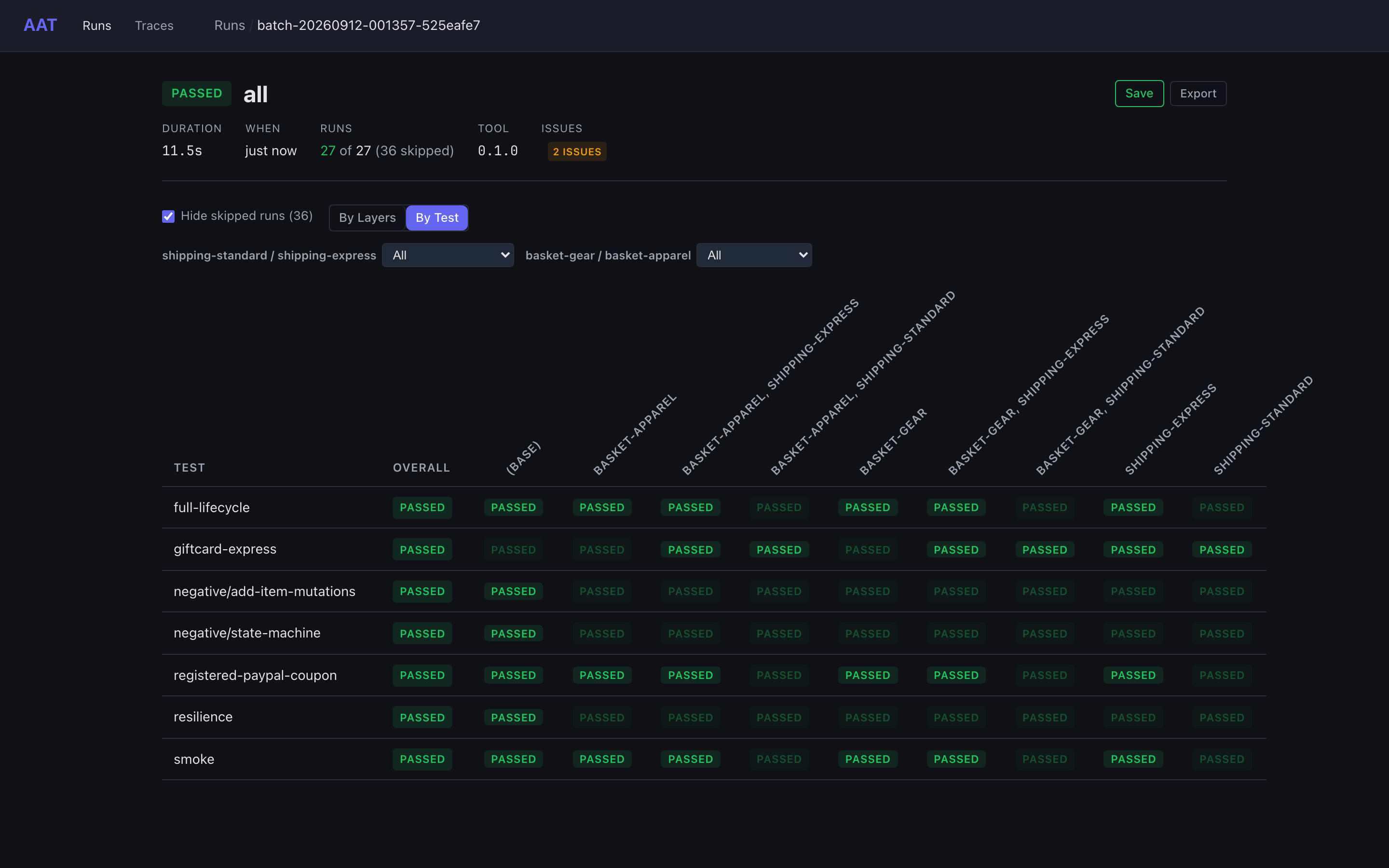
aat run batch --layer-group shipping-standard,shipping-express --layer-group basket-gear,basket-apparel --parallel 4
aat web view latest                # open the batch in the browser; press Ctrl+C when done
kill %1                            # stop the sandbox
In a source checkout, make build at the repository root builds both binaries; run them from this
directory as ../../aat and ../../aat-sandbox.
What just happened
full-lifecycle takes one order through every state in 14 steps, verifies the result in a 15th, and cleans up
(output trimmed):
  [ 1/15] listProducts         200  0ms
  [ 2/15] checkInventory       200  609ms  retried 1x: response_error
  [ 3/15] createCart           201  0ms
  [ 4/15] addProduct (addItem) 201  0ms
  [ 5/15] addSocks (addItem)   201  0ms
  ...
  [ 8/15] checkout             201  0ms
          Order: ord_0001
          Receipt: RCPT-US-0001
          Tax: Sales tax 8.25%
          Total: $130.66
  [ 9/15] paymentCharge        201  351ms
          Charged: $130.66
  [10/15] shipOrder            201  601ms
          Tracking: 1Z298498081
  [11/15] getShipment          200  1.3s  retried 2x: transient
  ...
  [15/15] verify_getOrder      200  0ms

  cleanup:
    deleteOrder            204  0ms
    deleteCart             204  0ms

PASSED (15/15 steps, 2.9s)
- Nobody wired the data by hand.
graph.yamldeclares where inputs come from:cartIdfromcreateCart,orderId,amount, andcurrencyfromcheckoutCart, and the SKU from the firstlistProductsentry withinStock == true. The plan lists steps; AAT resolves the values. - Two hosts, two credentials. The shop API wants an OAuth2 bearer token, which AAT fetches from
/oauth/token.env.yamlroutespayment*operations to the payments listener with an API key instead, and the bearer token is not sent there. - Retries by category. The first inventory read of
SKU-1004answers200withstatus: ERROR; the graph'serrorDetectionrule turns that into aresponse_error, which the step's retry rule accepts. Shipment tracking answers503twice, atransienterror. A step's duration includes the waits between its attempts. - A response join.
getCartreturns lines as SKU and quantity only; a Lua transform intemplates/getCart.yamljoins in names and prices from the response'sproductsarray. - Verification and cleanup. Step 15 checks that the order ended
returnedandrefunded. Cleanup deletes the order and the cart whether the run passed or not.
Every run writes an archive under _output/runs/. aat web view latest shows it: a timeline with the
350 ms charge and the 600 ms shipment, each request and response with Copy as cURL, the value
resolution behind every input, and a Receipt tab rendered by visualizers/order-receipt.html.
One plan, many runs: layers and dedup
A layer is a named set of input values (layers/). Each --layer-group adds a dimension with an
implicit "none", so two groups of two layers make 9 permutations per plan: 63 runs for 7 plans.
AAT instantiates every run first and skips the ones that would send identical requests:
aat: batch run — 7 plans x 9 permutations = 63 total runs (parallel=4)
aat: dedup — 36 duplicate permutations detected:
  giftcard-express [(base)] → duplicate of giftcard-express [shipping-express]
  negative/state-machine [basket-gear] → duplicate of negative/state-machine [(base)]
  smoke [shipping-standard] → duplicate of smoke [(base)]
  ...
Batch: 27/63 PASSED, 36 SKIPPED
shipping-standardmatches the graph default, so it collapses into(base).giftcard-expressalready appliesshipping-express, so the express permutations collapse.- The negative plans and
resiliencepin every input a layer could change, so they run once.
| Layers | Input they set |
|---|---|
shipping-standard, shipping-express, shipping-overnight |
shippingTier (overnight is US-only) |
basket-gear, basket-apparel, basket-footwear |
listProducts.category |
card-visa, card-amex |
cardNumber |
coupon-save10, coupon-freeship |
applyCoupon.code |
delivery-soon, delivery-later |
checkoutCart.deliveryDate ({{today + 3 days}}, + 14 days) |
Two regions
env.yaml holds two environments that share everything through _base and differ only in
variables; aat env list shows us (the default) and eu.
environments:
  _base:
    apiBaseUrl: http://${apiHost}/${region}/v1
    overrides:
      - match: "payment*"
        baseUrl: http://${payHost}/${region}/v1
        auth: {type: apikey, headerName: X-API-Key, credentials: {key: {source: literal, value: pay-demo-key}}}
  us: {extends: _base, vars: {region: us, postalCode: "78701"}}
  eu: {extends: _base, vars: {region: eu, postalCode: "10115"}}
aat run plan smoke --env eu prices in euros with VAT included (Tax: VAT 20% (included)). The
regions have their own rules too: aat run plan smoke --env eu --layer shipping-overnight fails at
checkout with 422 TIER_NOT_AVAILABLE.
Workflows, slots, and addons
Most plans are recipes: a few lines that pick a workflow and its options.
kind: recipe
selection:
  workflow: Checkout
  choices:
    customer: Registered
    payment: PayPal
  addons: [Apply Coupon, Return After Delivery]
- Quick Purchase (
workflows/quick-purchase.yaml) is the shortest purchase and ends at payment. - Checkout (
workflows/checkout.yaml) has two slots,customer(Guest, Registered) andpayment(Card, Gift Card, PayPal), and ends at shipping with a verification step that the ordershipped. - Addons splice extra steps in: Inventory Check, Apply Coupon, Track Shipment, and
Return After Delivery (deliver, return, refund). An addon can bring its own verification:
Return After Delivery replaces the
shippedcheck withreturnedandrefunded.
aat plan list summarizes each plan and recipe.
Negative tests
internal/plans/negative/state-machine.yamldrives an order through transitions the API must refuse (ship before payment, pay twice, refund twice, …). Each is anexpectFailurestep that passes when the listed status comes back.internal/plans/negative/add-item-mutations.yamlturns oneaddItemcall into five rejected variants withmutations:(zero quantity, unknown SKU, out of stock, more than in stock, malformed JSON).-
overlays/declined-card.yamlmakes any card payment a negative test without editing a plan:aat run plan smoke --overlay overlays/declined-card.yaml # paymentCharge 402, PASSED
Checkpoints: hand a live order to another tool
aat run plan smoke --stop-after paymentCharge --dump-state state.json --dump-state-secrets
order=$(jq -r '.values["checkout.orderId"]' state.json)
curl -s -H "$(jq -r '"Authorization: " + .auth.headers.Authorization' state.json)" \
  "localhost:8765/us/v1/orders/$order"
The run stops after the payment without cleanup, so the paid order stays live for a test harness, a
debugger, or a hand-written request. The payment ran on the payments host with its own API key, yet
the top-level auth in state.json is still the shop's bearer token; each entry in steps records
the host and headers its own request used (paymentCharge shows X-API-Key). A dump redacts
credentials unless asked: --dump-state-secrets keeps the live token that curl sends, so
state.json holds live credentials. It is written with mode 0600 and git-ignored.
Contract checks
openapi.yaml is the API's contract.
aat validate --strictchecks the graph against it: operation IDs, inputs, required parameters, and outputs.aat run batch --oas-validate strictvalidates every request and response at run time and fails a step on a violation.aat generate --oas openapi.yaml --output-graph -prints the graph AAT scaffolds from the spec alone, without writing any files; compare it withgraph.yamlto see what a hand-tuned graph adds (data flow, cleanup, error detection, workflows).
Local development
Copy .aat-overrides.yaml.example to .aat-overrides.yaml to send single operations to a local
build while everything else keeps using the sandbox. AAT picks the file up automatically;
--no-auto-overrides turns it off.
MCP: teach an AI coding tool this API
.mcp.json registers two MCP servers for tools such as Claude Code. shop-api reads the
integration kit (aat-kit.yaml, below) and has read-only tools that describe operations, data flow,
and the OpenAPI contract: what an integrator's AI tool would see. shop-test reads the whole project
and adds plan tools, including execution. .claude/settings.json pre-approves the read-only
shop-api tools. Start the sandbox, open this directory in Claude Code with aat on your PATH, and give
it this prompt, naming any language you like:
Using only the shop-api MCP server for knowledge of the shop API (no web search, no guessing), write a working Python 3 (standard library only) command-line client for the shop API in this directory. It must place an order for two different in-stock products, pay for it by card, then cancel the order and refund the payment, and print the order ID, the order total, and the order's final status and payment status. The shop sandbox is already running locally. Run the client and show me its output.
Given only the packaged kit's MCP server, this prompt produced a working Python client and a working Go client on their first run. Reproduce the single-prompt test has the locked-down setup that was used and the results.
The integration kit
The project that tests the shop API also holds what its integrators need, so part of it ships as a
kit. aat-kit.yaml names that part: the graph, templates, OpenAPI spec, domain file, workflows,
env.yaml, and the reference plans in plans/. The suites in internal/plans/, the layers, the
overlays, and the visualizer stay here.
aat validate --strict --manifest aat-kit.yaml   # check the kit on its own
sh package-kit.sh                                # writes _output/shop-kit/ and _output/shop-kit.tar.gz
The package holds the kit manifest as its aat-project.yaml and KIT-README.md as its README. In the
repository, make example-shop packages the kit, unpacks it into an empty directory, and validates and
runs it there against the sandbox. Share Your API with Integrators
describes the layout for your own API.
The sandbox
| Shop API | http://localhost:8765/{us,eu}/v1, OAuth2 password grant demo/demo, client aat-shop/aat-shop-secret |
| Payments API | http://localhost:8766/{us,eu}/v1, header X-API-Key: pay-demo-key |
| Payments over gRPC | grpc://localhost:8767, service shop.v1.Payments, metadata x-api-key: pay-demo-key. The same payments, against the same orders — see the gRPC guide |
| Regions | us: USD, 8.25% sales tax added. eu: EUR, 20% VAT included, no overnight tier |
| Test values | card 4000000000000002 is declined; gift cards GC-10-DEMO ($10), GC-100-DEMO, GC-500-DEMO; coupons SAVE10, FREESHIP, EU-ONLY; SKU-1005 is out of stock |
| Chaos | first GET /inventory/SKU-1004 per token is a stale status: ERROR; GET /shipments/{id} answers 503 twice per shipment |
| Reset | POST http://localhost:8765/admin/reset |
aat-sandbox serve flags: --latency 0 removes the simulated delays, --seed fixes tokens and
tracking numbers (default 1), --no-auth disables both credential checks, and --host 0.0.0.0
accepts connections from other machines or containers (the default is 127.0.0.1).
A sandbox somewhere else — other ports, another machine, a container — needs no edits here:
env.yaml reaches it through the apiHost and payHost vars, which --var overrides for one run:
aat run plan smoke --var apiHost=localhost:9765 --var payHost=localhost:9766
Files
aat-project.yaml               manifest: where everything below lives, default environment
aat-kit.yaml                   the integration kit's manifest: the part integrators get
graph.yaml                     18 operations: inputs, outputs, data flow, cleanup, workflows
openapi.yaml                   the API contract
templates/                     one HTTP request/response template per operation
domain.yaml                    concepts, types, and value pools for AI tools
env.yaml                       us and eu environments, payments routing
workflows/                     Quick Purchase and Checkout, slot options, addons
plans/                         reference plans the kit ships: smoke, full-lifecycle, a recipe
internal/plans/                suites that stay here: resilience, giftcard-express, negative tests
layers/                        12 layers for batch matrices
overlays/declined-card.yaml    negative test without editing a plan
visualizers/                   the Receipt tab for order responses
KIT-README.md, package-kit.sh  the kit's README and the script that packages the kit
.mcp.json, .claude/            MCP servers and Claude Code permissions
.aat-overrides.yaml.example    local-development routing